One ledger under everything.
Dot Sms Business One is a browser-based, multi-branch ERP for restaurants and fast-food chains in which every sale, purchase, transfer and wastage writes its own double-entry accounting.
A touch POS, table QR ordering, a kitchen display, recipe-driven inventory at moving-average cost, purchases, payroll, banking, a full general ledger with Balance Sheet, Profit & Loss, Cash Flow and a net-worth report — one system from the counter to the Balance Sheet, with an owner’s mobile app on top. It runs at dotsms.net, is sold as a service (one platform, many businesses), and is live in production with real restaurants.
From a purchase order to a statement, without re-keying.
Counter, tables, kitchen, delivery
The touch POS takes counter, table and delivery orders; each table has a QR code so guests order from their phone into the same order inbox; the Kitchen Display shows every order with a timer; delivery orders are handed to the rider through WhatsApp. Tips, split payments, credit customers, sale returns, combos, deals and promotions are all on the same screen.
Recipes, stock, purchases, waste, transfers
Every menu item carries a recipe, so a sale takes the ingredients off the shelf in base units at the branch’s moving-average cost. Purchases run Purchase Order → Goods Receipt → PO Invoice. Waste is entered with a reason, approved, and recovered where it can be sold. Stock moves between branches through Stock Issue → In Transit → Stock Receive.
Vouchers, closing, statements, rights, audit
Each document posts its own voucher, so the books are always complete. Daily Branch Closing closes the day and the closed day stays closed — even for the admin. Eleven statements are computed on the server; user privileges are checked on every save; every change and refusal lands in an audit log nobody can edit.
Built for multi-branch from day one.
Head office and outlets share one ledger.
- Purchases through head office; stock issued to branches through Stock In Transit.
- Cash sent up through Cash Funds in Transit; inter-branch current accounts that net to nought.
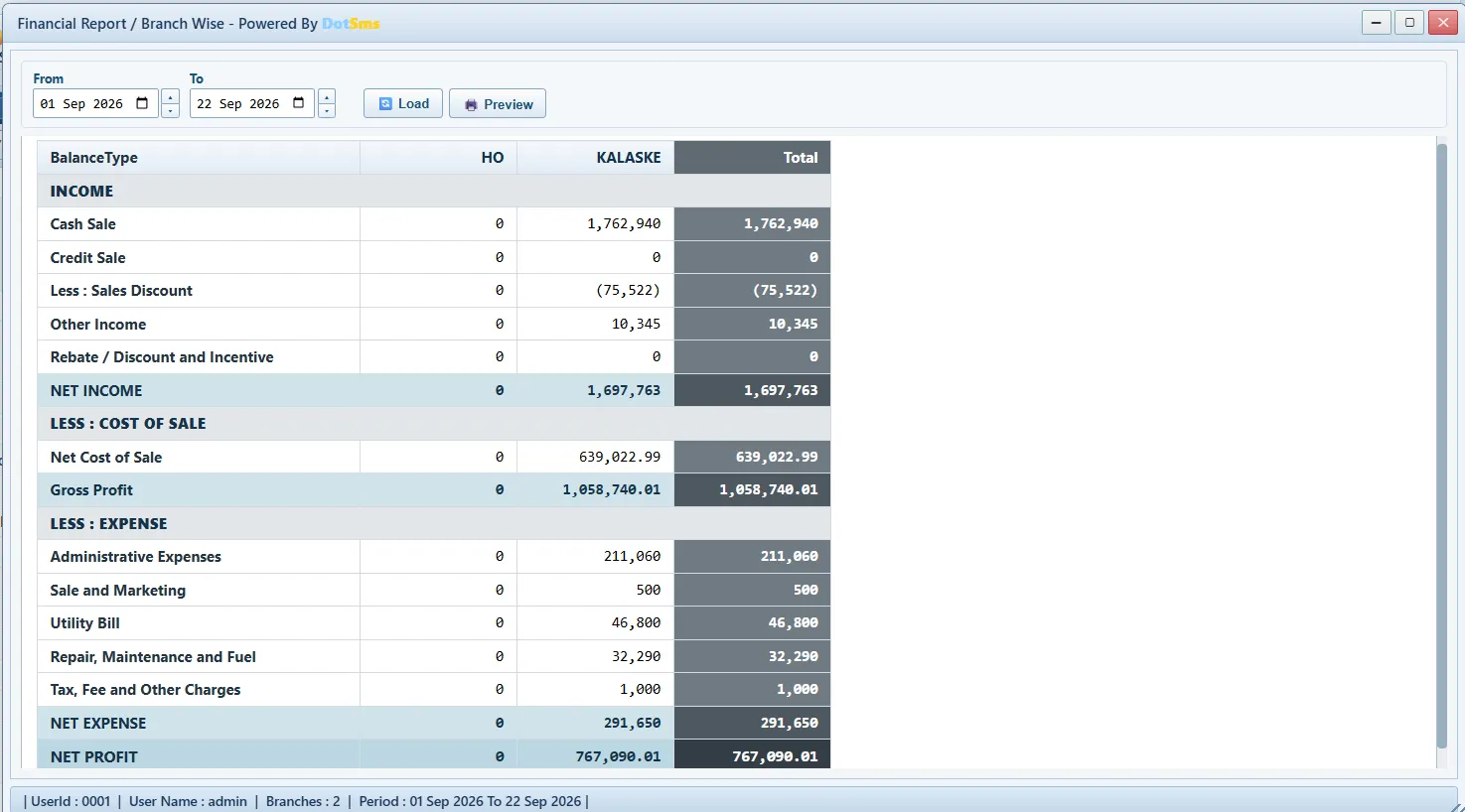
- Branch-wise Profit & Loss, Balance Sheet and Daily Closing — and the company as a whole.
- One login shows the chain; each manager sees only their branch.
Release notes.
What went live recently — every item is in production unless marked Ready.
- 21 SepKitchen module — machines, cylinder registry with serials, machine monitoring, runtime reportsLive
- 21 SepPurchase Reports, Supplier Ledger, Issue & Receive Report, Payable Reports — server-side report registriesLive
- 21 SepAuto-refresh of every open browser after a releaseLive
- 20 SepPurchase via Head Office — receipt at the branch, purchase booked at HO, issue and receive posted automaticallyLive
- 20 SepFund Receive guard — a fund is received once, against the Pay it answers, on screen and on the serverReady
- 19 SepBalance Sheet, Worth Report, Cash Flow Indirect Method, Branch-wise Financial ReportLive
- 19 SepStock Issue → In Transit → Stock Receive between branchesLive
- 18 SepSub-Recipe Setup and ProductionLive
- 15 SepStock Reconciliation approval → Stock Adjustment; Waste Entry, Approval and Recovery SaleLive
- 12 SepDot Sms Owner mobile app with push alertsLive
Release notes, September 2026.
The words we use.
The same terms appear on this site and on every screen of the product.
- Business
- One customer company on the platform (a tenant), with its own address dotsms.net/<business>, users, branches and data
- Branch
- An outlet or the head office (HO); every entry carries its branch; statements run per branch or consolidated
- Module
- A group of screens sold as a unit (Accounts, Inventory, …); switched on per business by Dot Sms
- Master Data / Transactions / Reports & Analytics
- The three panels every module opens with: setup records, day-to-day entries, and reports
- POS
- The touch point-of-sale screen for counter, table and delivery orders
- QR ordering
- Each table has a QR code; guests order from their phone into the same order inbox
- Kitchen Display
- The kitchen’s screen of orders with timers
- Recipe
- The ingredients (in base units) a menu item consumes when sold
- Sub-recipe
- A batch the kitchen makes (sauce, dough) that becomes a stock item costed from its ingredients
- Cost book
- The per-item, per-branch moving weighted-average valuation of stock; the source of cost of sales
- Revalue cost of sales
- The one-click correction that re-charges sales made before their goods were billed, once the bill is in
- Goods Receipt Note (GRN)
- The delivery signed for at a branch; it moves stock but posts no purchase
- PO Invoice
- The supplier’s bill against a delivery; the one entry that books the purchase (stock against supplier)
- Stock Issue / In Transit / Receive
- The three steps of moving stock between branches
- Fund Transfer / Cash Funds in Transit
- Cash sent from a branch and received at head office; a fund is received once, against the Pay it answers
- Inter-branch current account
- The ledger head that holds what one branch owes another; nets to nought across the company
- Voucher
- A balanced accounting entry (JV, CPV, CRV, BPV, BRV); most are written automatically by documents
- Daily Branch Closing
- The end-of-day cash statement that closes the day; a closed day cannot be changed without re-opening
- Closed-day lock
- Nothing dated on a closed day can be added, changed or deleted — by anyone
- Stock Reconciliation
- A physical count; an approval decides; a Stock Adjustment posts the difference
- Waste Entry / Approval / Recovery Sale
- Recording what was thrown out and why, approving it, and selling what could still be sold
- Worth Report
- Net worth as of a day — assets minus liabilities — with a seven-line reconciliation
- Audit log
- The server-written, unchangeable record of every change, delete and refusal
- User Privileges
- Rights per form, per action (add/edit/delete/print), per branch, with day limits — enforced by the server
- Landlord
- Dot Sms’s own console for creating businesses and switching their modules and features
- Owner app (Dot Sms Owner)
- The owner’s phone app with today’s figures, reports and push alerts
- Print Agent
- The small program on the counter PC that prints slips and bills without a print dialog
See it on your own menu.
A demo runs on your own menu and your own branches; nothing to install.