
ERP & POS software · Pakistan

Run your business smarter. Faster. Better.

Restaurants, clothing shops, medical stores, mobile and electronics, wholesale — Dot Sms has a system for each, and builds one to order when none of them fits. Your counter takes the sale; the stock, the suppliers and the account books keep themselves.

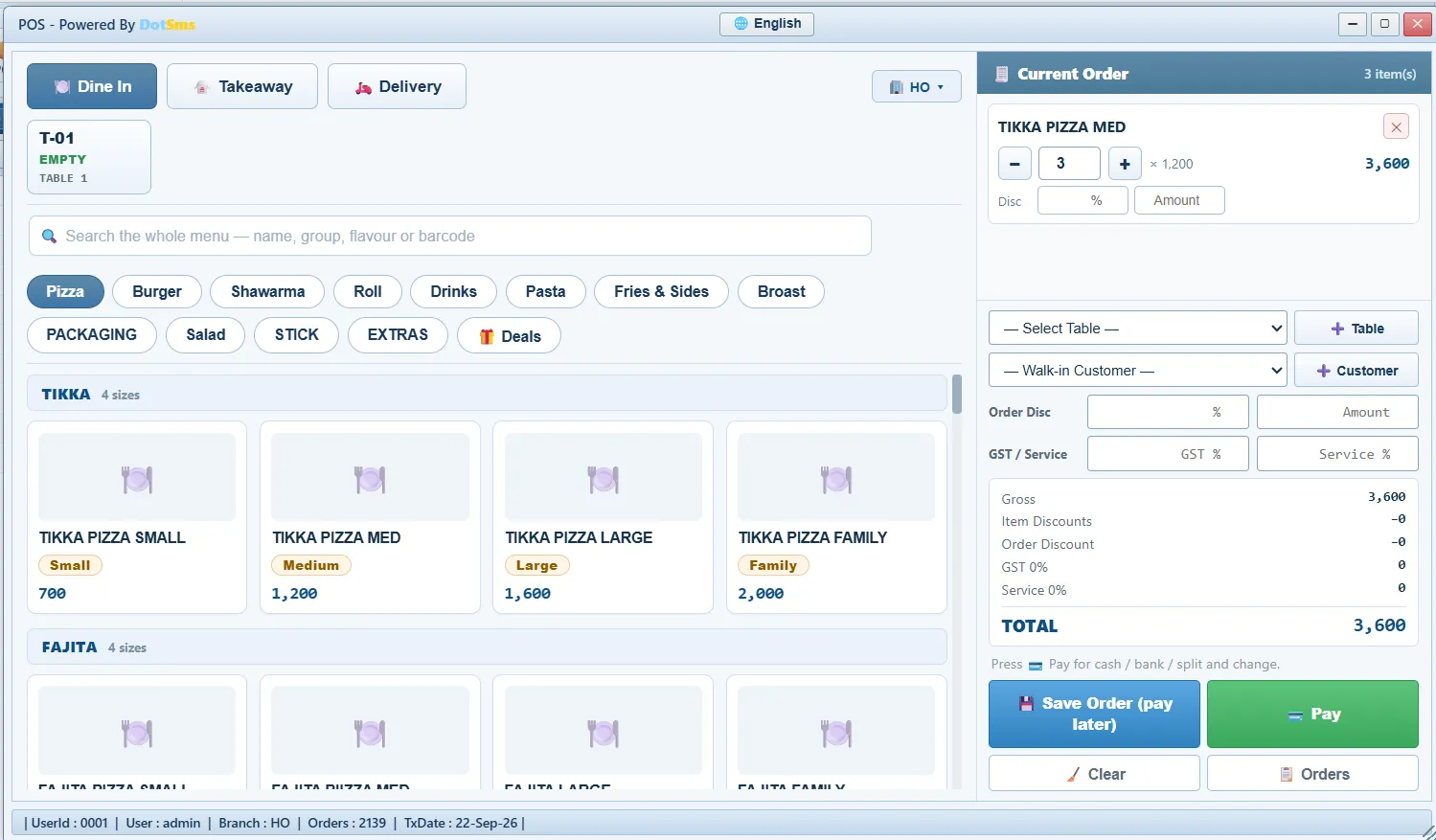
POS screen in Dot Sms Business One
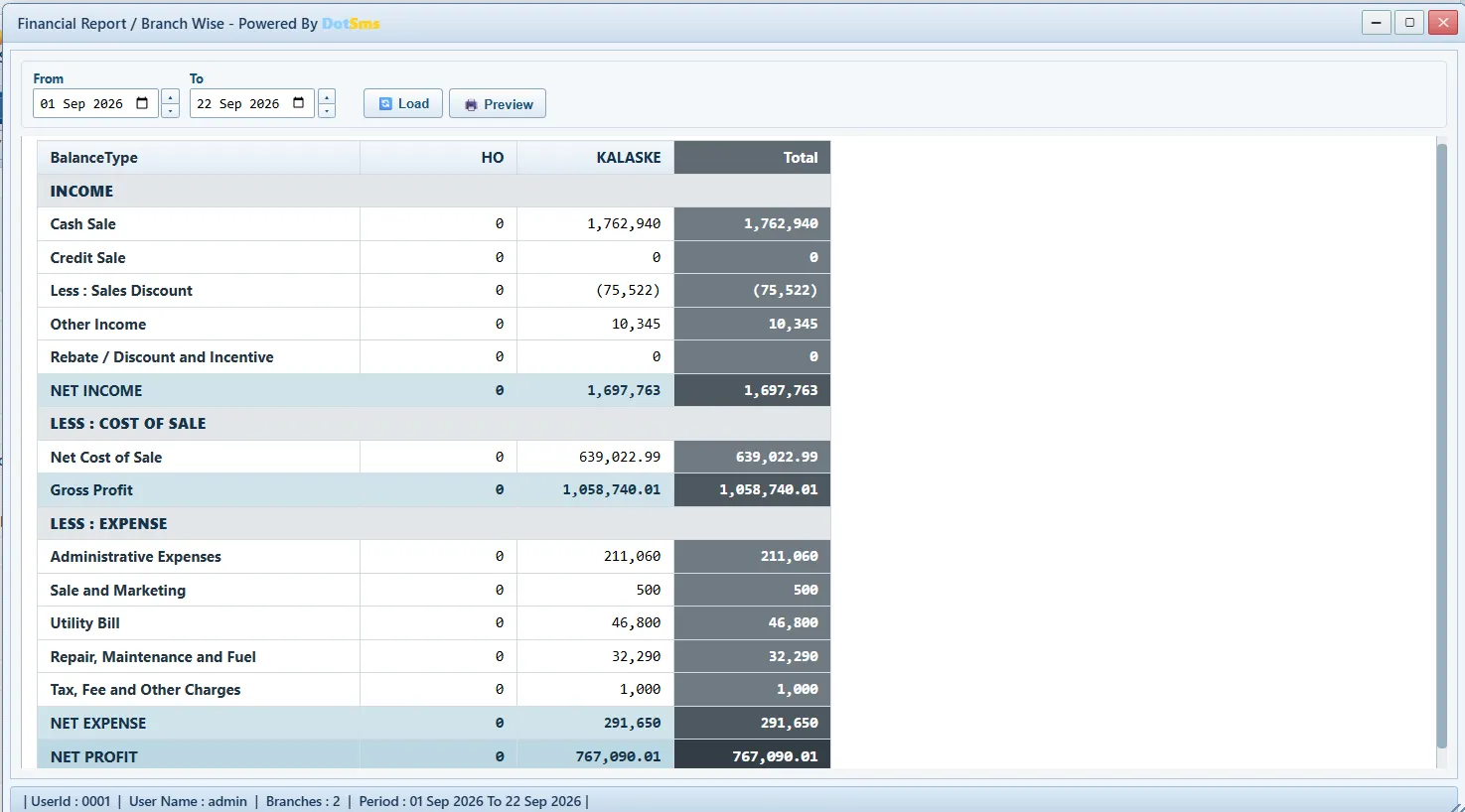
Financial Report / Branch Wise screen in Dot Sms Business One
POS Inventory Purchase Recipes Accounts Payroll Banking Kitchen Reports Owner app
  • Simplify Operations
  • Save Time
  • Grow Your Business
10parts — switch on only what you need
123screens, covering the whole restaurant
11account reports, ready without an accountant
244checks run before any update reaches you
Livein real restaurants today
What we make

A system for your kind of shop.

Dot Sms is not one program. It is one engine — stock, counter, customers, suppliers and a full set of books — shaped for the trade you are actually in. Pick yours.

Or something built for you

If your trade is not on this list, or you run it in a way no ready-made system allows, we build it. That is what this company did before it had products of its own — tell us how the business works and we will quote you.

Tell us about your business
Dot Sms Business One · restaurants

Take the restaurant one, as an example.

The rest of this page follows Business One, the system for fast food and restaurants — the oldest of them and the one running in real outlets today. The counter, the kitchen, the store room, the staff, the bank and the accounts are one system, for a single outlet or a chain, and it opens in a browser with nothing to install. The others are built the same way, on the same engine, with the parts their trade needs.

How it works

One order. Everything else happens by itself.

Your cashier rings up the bill. The kitchen, the store room and the account books all catch up on their own — nobody writes anything down twice.

  1. You do this

    The cashier takes the order

    A burger and a cold drink, rung up on the counter screen. This is the only step a person does.

  2. The software does this

    The kitchen sees it at once

    The order shows on the kitchen screen with a timer, and the slip prints itself.

  3. The software does this

    The store room goes down

    The bun, the chicken and the cheese in that burger come off the shelf. Nobody counts them by hand.

  4. The software does this

    The accounts write themselves

    What came in, what the food cost, and what is left over — entered in the books at that moment.

  5. The software does this

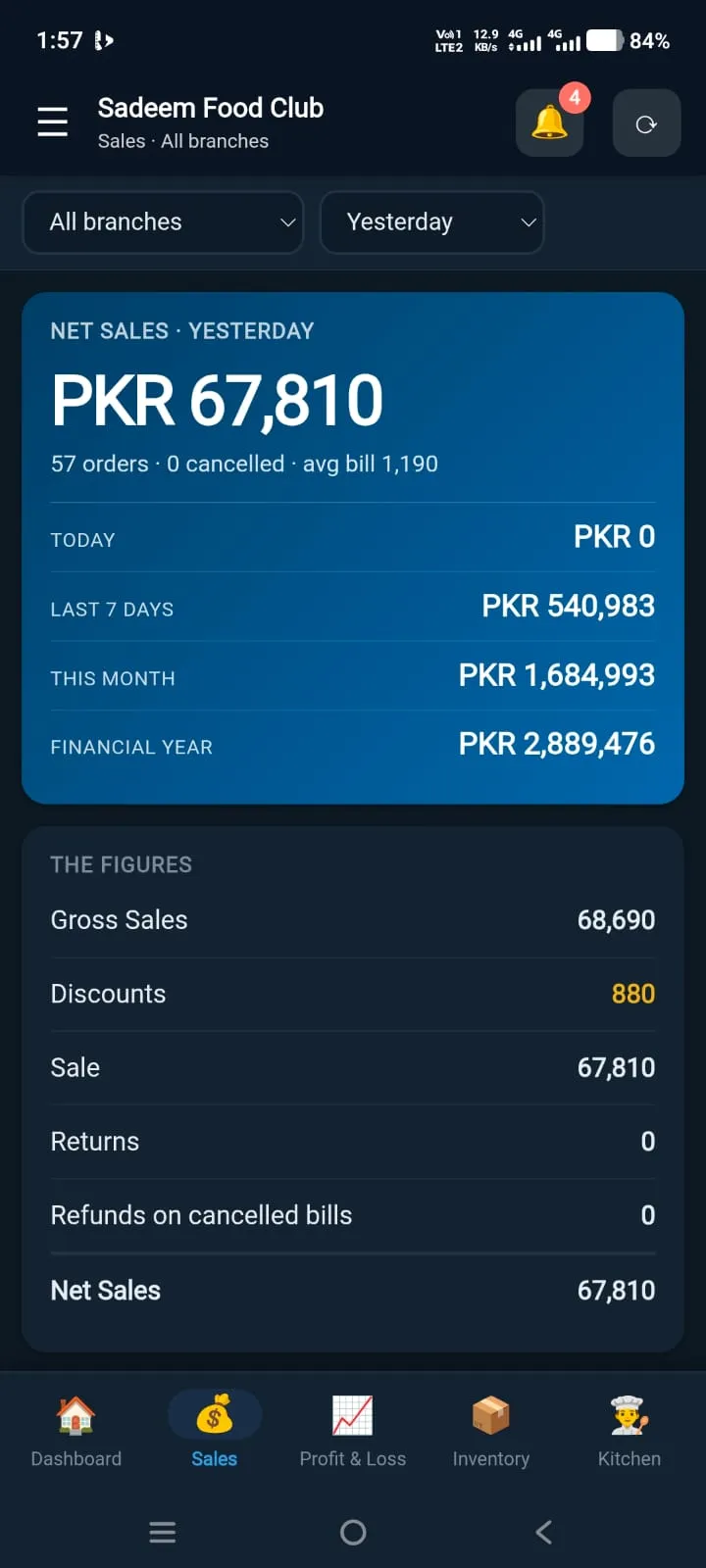
    You see it on your phone

    Today’s sale and today’s profit, for every branch, wherever you are.

Example figures, to show the steps.

See how the counter, the kitchen and the office connect →

Why Business One

Most restaurant software stops at the bill. This one carries on.

Most restaurant software prints the bill and stops. Here the same bill also sends the order to the kitchen, takes that dish’s ingredients off the shelf at what they actually cost you, and writes the sale and its cost into the books — at that moment, without anyone entering it again.

What a restaurant needsRegisters, Excel and a separate accountantA billing machine that stops at the billDot Sms Business One
The bill takes the ingredients off the shelfby itself, the moment the order is rung upNoPartlyYes
The bill writes its own entry in the booksthe sale and what it cost you — nothing to enter again at month endNoNoYes
Stock is worth what you actually paid for itand is corrected when the supplier’s bill turns out differentNoNoYes
Profit, cash and what the business is worth — for each branchPartlyNoYes
Head office and outlets on one set of booksgoods and money moving between branches are trackedNoNoYes
The system checks its own figures and shows any gapNoNoYes
A staff member cannot open what you did not allowthe rule is kept on the server, not just hidden on the screenNoPartlyYes
Every change is recorded, and a closed day stays closedNoPartlyYes
The owner’s phone shows the same figures as the officeNoPartlyYes
Kitchen screen, QR ordering at the table, rider sent on WhatsAppNoPartlyYes
The counter keeps working when the internet dropsNoPartlyYes
Menu, kitchen slip and bill in UrduNoPartlyYes

Twelve things an ordinary billing machine will not do.

All twelve, in detail

What’s new

Built in the open — new every week.

Every update is tested (244 automatic checks) and tried on a practice copy before it reaches your restaurant. Screens that are already open move to the new version on their own — nobody has to install anything.

Full release notes →

  1. 22 SepSign up online — choose a plan on the website, transfer the fee, and your business is opened with its own address as soon as the payment is confirmedLive
  2. 22 SepPlans that mean what they say — Basic, Professional and Business switch on exactly the screens listed on the pricing pageLive
  3. 21 SepKitchen module — machines, cylinder registry with serials, machine monitoring, runtime reportsLive
  4. 21 SepPurchase Reports, Supplier Ledger, Issue & Receive Report, Payable Reports — server-side report registriesLive
  5. 21 SepAuto-refresh of every open browser after a releaseLive
  6. 20 SepPurchase via Head Office — receipt at the branch, purchase booked at HO, issue and receive posted automaticallyLive

Release notes, September 2026.

Dot Sms Owner

The business in your pocket.

Today’s sale, cash, expenses and profit for each branch, a warning when stock runs low, and the same reports you see on the computer — down to the rupee.

  • “Sales crossed 100,000 today”
  • “KALASKE closed the day at a loss”
  • “Negative stock: Chicken boneless”

About the Owner app

Pricing

Two plans. Pick the modules, pay per branch.

The four modules a shop cannot run without, or all ten — and a rate for each branch you open, in rupees. Nothing per counter and nothing per user. The same two plans whatever you sell.

Basic Plan

The four modules a shop cannot run without

PKR 4,000/ branch / month

  • 4 modules
  • 81 screens
  • Per branch
  • Accounts24
  • Inventory22
  • Purchase12
  • Sales23
  • Payroll / HR19
  • Banking8
  • Log Reports3
  • A/C Payable3
  • A/C Receivable3
  • Kitchen6
  • Accounts — a full set of books, written by the sales themselves
  • Inventory — stock that goes down as you sell, counted and corrected
  • Sale — the counter, customers, credit, returns
  • Purchase — suppliers, bills, returns and what you owe
Reliable & secure Professional support Cloud-based access Access anytime, anywhere

Compare every feature of every plan →

Safety: Each person sees only what you allow. Every change is recorded and the record cannot be edited by anyone. Once a day is closed, it stays closed — even for you. More about safety →

Customer reviews

What Businesses Say About DotSms

See how businesses use DotSms Business One to simplify operations, manage sales, control inventory and keep their accounts connected.

  • Sadeem Food Club

    Fast Food & Restaurant

    “DotSms has made our restaurant operations much easier. Sales, inventory, recipes and accounts are now connected in one system.”

    Ahmed KhanOwner
    Mirpur, AJK
  • Urban Bites

    Restaurant

    “Managing daily sales and stock used to take a lot of time. DotSms gives our team a much clearer view of the business.”

    Hamza MalikOperations Manager
    Islamabad
  • Royal Bakers

    Bakery

    “The inventory and sales features help us keep better control of our bakery operations and daily transactions.”

    Bilal AhmedOwner
    Rawalpindi
  • Spice Street

    Restaurant

    “DotSms brings our sales, inventory and accounting information together, making daily management much more organized.”

    Usman AliGeneral Manager
    Lahore
  • Fresh Bite Cafe

    Cafe

    “The POS is simple for our staff to use and the reports help us understand what is happening in the business.”

    Hassan RazaOwner
    Islamabad
  • Food Junction

    Fast Food

    “Our team can process orders faster and keep track of stock more efficiently with DotSms.”

    Saad AhmedOwner
    Gujrat
  • Green Leaf Restaurant

    Restaurant

    “Having sales, inventory and accounts in one system gives us much better control over our daily operations.”

    Fahad IqbalManager
    Lahore
  • Taste House

    Restaurant

    “The reporting system makes it easier for us to review our business performance and identify areas that need attention.”

    Adeel HussainOwner
    Mirpur, AJK
  • Burger Point

    Fast Food

    “Our order management and inventory tracking have become much more structured after moving to an integrated ERP system.”

    Waqas AhmedOwner
    Rawalpindi
  • Coffee Corner

    Cafe

    “DotSms gives us a simple way to manage sales and keep our business information organized.”

    Ali HassanFounder
    Islamabad
  • Family Restaurant

    Restaurant

    “The combination of POS, inventory and accounts makes everyday restaurant management much easier.”

    Salman RiazOwner
    Gujranwala
  • The Food Factory

    Fast Food

    “We needed one system instead of managing different records separately. DotSms provides that centralized approach.”

    Imran ShahOperations Manager
    Lahore
  • Royal Grill

    Restaurant

    “The reports give us a clearer picture of sales and inventory, helping management make better-informed business decisions.”

    Kamran AsifOwner
    Islamabad
  • Sweet House

    Bakery & Sweets

    “Tracking products, purchases and sales in one place has made our daily workflow more organized.”

    Danish AhmedManager
    Rawalpindi
  • Downtown Cafe

    Cafe

    “Our staff quickly adapted to the POS and the management reports are useful for reviewing daily performance.”

    Rizwan MalikOwner
    Lahore
  • Grill & Go

    Fast Food

    “DotSms gives us better visibility into sales, stock and business activity without maintaining multiple separate records.”

    Shahzaib KhanOwner
    Gujrat
  • City Dine

    Restaurant

    “The centralized system helps our management team monitor operations and keep important business information together.”

    Naveed AhmedGeneral Manager
    Islamabad
  • Food Avenue

    Restaurant

    “The combination of POS, inventory and accounting gives us a more complete view of our restaurant.”

    Arslan RazaOwner
    Mirpur, AJK
  • Cafe Lounge

    Cafe

    “DotSms provides the tools we need to manage everyday sales and keep our business records organized.”

    Zain MalikFounder
    Lahore
  • Prime Foods

    Food Business

    “The system helps our team manage daily operations more systematically and gives management useful reports.”

    Tariq HussainOwner
    Rawalpindi
FAQ

Questions owners ask

Do I need to install anything?

No. It runs in Chrome or Edge on any PC, tablet or phone. An optional Print Agent on the counter PC sends slips straight to the thermal printer.

Does it do proper accounting, or only sales?

Proper accounting. Profit and loss, balance sheet, cash flow, what the business is worth — and every sale, purchase and payment writes its own entry as it happens, so nothing has to be entered again for the accountant.

We have several branches.

Head office and every outlet sit on one set of books. Goods and money moving between branches are tracked while they are on the way, and every report can be for one branch or for all of them together.

How does it know my food cost?

Each dish has a list of what goes into it. When the dish is sold, those ingredients come off the shelf at what you actually paid for them. If the supplier’s bill turns out different, the figure is corrected back to the sales it belongs to.

Can staff delete things?

Only what you allow them — screen by screen, action by action, branch by branch. The rule is kept on the server, so it cannot be got round from the screen. Every change, and every refused attempt, is recorded.

What if the internet drops at the counter?

Orders are kept in the browser and sent when the line returns; a slow line is shown on screen.

Can the owner see it on a phone?

Yes — the Dot Sms Owner app (web app or Android) with its own logins and push alerts.

Is my data separate from other businesses?

Yes. The separation is built into the database itself, not just into the screens, so one business can never see another’s figures.

Can it work in Urdu?

Yes — the menu on the counter, the kitchen slip and the customer’s bill can all be in Urdu.

How do we start?

Request a demo; it runs on your own menu and branches.

Your business. Our technology. A better tomorrow.

See it on your own items and your own prices — request a demo or message us on WhatsApp.